28 April 2011

Android Dev Team #12 Week April 20-26
Android Dev Team #12
Week April 20-26The progress:
So far the android app has a new gesture comparison algorithm similar to the one dollar gesture recognizer algorithm. The alteration is simpler in that it doesn't have rotation and the number of points for resampling and the bound box is a much smaller scale. The recognition is based on the point by point difference between the gesture inputted via the android app to a new gesture inputted by the fabric device. While the fabric device is configured on a separate app designed by Matthew Moss, I will port the blue tooth communication over to the main android app I am working on.
The app also has Text To Speech implemented. The application will now respond to input by sound, prompting the user with the gesture it is comparing the input gesture to. It is meant to completely replace the screen by earpiece sound and fabric input on bluetooth. However I do not know if adding the bluetooth headset for outbound sound will be within the scope of this project.
I had to change the way I had input the buttons by the device earlier this week as it had been causing my algorithm to not work correctly. The way I was doing this before was by grabbing each button top to bottom and right to left, causing an incorrect path. This has modified to input the button being pressed in series by the sequence in which they are being pressed. Also, I had to modify the gesture table in the sqlite database to contain not just numbers, but points sorted by which the order they are being pressed in the template x,y; where the colon is the delimiter that another point is in the gesture and a null character terminator. e.g. 5,8;5,7;6,7;\0
Things to do:
I need to make my android app work with the fabric device. I will do this by copying the code from Matt's testing app. Once this is in place, I will need to alter my input algorithm to match the fabric instead of the previous way of using the touch screen on the phone to input gestures. This may prove to be challenging. I plan on having the user make a single gesture, after the finger has removed pressure from all the buttons on the fabric interface, after a second the gesture with all the buttons that had pressure applied will be submitted for testing.
The professor had also mentioned changing the gesture database to be input straight from the fabric device itself so that it will have the same variations the fabric outputs have, as opposed to the phone touch interface, as it differs quite a bit. The fabric seems to apply pressure to multiple buttons surrounding the button the user wants to apply pressure to. Michael and Matt and working on making the button pressure more exact by applying some type of buffer material so that finger pressure is precise. Also, the fabric is being working on by the other team, so we will need time to test the device with the android app once it has been refined for fabric testing, by meeting up some time later. Once the device and the application have been combined, we will by able to further test the combined system for a user study.
Once we near the end of the semester we will need to submit our code and documents to the GIT server as to preserve the project process for another semester. This is of minimal concern right now. Currently we are using a svn server that has been working fine for uploading and collaborating our progress with other team members.
Electronics Team #11 Week April 13-19
Electronics Team #11
Week April 13-19
Matt again.
When I'm not dedicating inordinate amounts of time to electronics for high altitude photography (similar to this) I'm working to test and better our touch pad interface. With Micheal. And it is going slow because I lack life experience with sewing and seaming. What we've found is a number of issues with the touchpad.
The most basic is that it doesn't like us. Our initial concern with unintended button presses has been brought to a painful forefront. Thereabouts of the only gesture that could possibly reliably work right now is slapping your hand down on your wrist. What tends to happen is that in the course of touching the pad hard enough to make a contact, a number of other contacts are also made. This leads to massive squares and square shaped entities of contact, which are useless from a recognition point of view. We expected some unintended presses, but also expected them to be confined to a small region. The current '1 press leads to chaos' mechanism isn't going to work.
In all likelyhood, this is caused by the separator material. We used felt as a compromise between pliability (for ease of making contacts) and strength, for keeping contacts broken. This doesn't seem to have worked out too well. We're going to try adding a plastic backing to reinforce the felt, ignoring compressibility in favor of usefulness, and we'll see where that takes us.
If given more time, I think the main thing that we should look at would be using a better separator. What I suspect we need is something more akin to a soft foam- like you'd get with certain pillows or foam pads. Something that basically acts as more of a spring, but with low tension- ie, can be easily compressed, but will keep enough distance that creases in the outer fabric layer won't lead to unintentional contact.
Ultimately, I suspect we're looking at a tradeoff between "pressure required to activate" and "accuracy of input". With the added bonus of "pain to work with". Some initial experiments with foam from hobby lobby reveal that cutting it to thin enough slices is a precise art, for which I am like 3 year old in an art museum. Getting holes in the separator is also rather difficult, the only reliable method I've had so far is to take a soldering iron to it and burn holes through it, hoping it doesn't catch fire or spew forth toxic fumes.
Other things to think about might just be the removal of a gesture system all together, in favor of an actual button pad. I don't believe a soldier is going to have much luck remembering more then five or so gestures; developing an actual special purpose key pad, rather then a touch pad, would probably be more successful, as it can be done with far fewer buttons, and thus without the need for multiplexing IO that led to our mass of touch detections.
Next week Micheal is up for chatting, until then we'll continue playing around with the prototype to try and get it closer to working. Somewhere in this set of things is getting the Bluetooth code integrated into Adams gesture recognition app, we'll see how far we can get with all these things.
When I'm not dedicating inordinate amounts of time to electronics for high altitude photography (similar to this) I'm working to test and better our touch pad interface. With Micheal. And it is going slow because I lack life experience with sewing and seaming. What we've found is a number of issues with the touchpad.
The most basic is that it doesn't like us. Our initial concern with unintended button presses has been brought to a painful forefront. Thereabouts of the only gesture that could possibly reliably work right now is slapping your hand down on your wrist. What tends to happen is that in the course of touching the pad hard enough to make a contact, a number of other contacts are also made. This leads to massive squares and square shaped entities of contact, which are useless from a recognition point of view. We expected some unintended presses, but also expected them to be confined to a small region. The current '1 press leads to chaos' mechanism isn't going to work.
In all likelyhood, this is caused by the separator material. We used felt as a compromise between pliability (for ease of making contacts) and strength, for keeping contacts broken. This doesn't seem to have worked out too well. We're going to try adding a plastic backing to reinforce the felt, ignoring compressibility in favor of usefulness, and we'll see where that takes us.
If given more time, I think the main thing that we should look at would be using a better separator. What I suspect we need is something more akin to a soft foam- like you'd get with certain pillows or foam pads. Something that basically acts as more of a spring, but with low tension- ie, can be easily compressed, but will keep enough distance that creases in the outer fabric layer won't lead to unintentional contact.
Ultimately, I suspect we're looking at a tradeoff between "pressure required to activate" and "accuracy of input". With the added bonus of "pain to work with". Some initial experiments with foam from hobby lobby reveal that cutting it to thin enough slices is a precise art, for which I am like 3 year old in an art museum. Getting holes in the separator is also rather difficult, the only reliable method I've had so far is to take a soldering iron to it and burn holes through it, hoping it doesn't catch fire or spew forth toxic fumes.
Other things to think about might just be the removal of a gesture system all together, in favor of an actual button pad. I don't believe a soldier is going to have much luck remembering more then five or so gestures; developing an actual special purpose key pad, rather then a touch pad, would probably be more successful, as it can be done with far fewer buttons, and thus without the need for multiplexing IO that led to our mass of touch detections.
Next week Micheal is up for chatting, until then we'll continue playing around with the prototype to try and get it closer to working. Somewhere in this set of things is getting the Bluetooth code integrated into Adams gesture recognition app, we'll see how far we can get with all these things.
Android Dev Team #11 Week April 13-19
Android Dev Team #11
Week April 13-19I did a revamp of the application, it was looking pretty ugly. It looks much nicer now. The user interface is cleaner. The input method has been refined. What I mean by that is that whenever the finger enters pressure on the screen the gesture is input and only after the submit or compare button the user is able to submit the gesture, and the screen gets cleared. We also have a clear button to undo anything that might be wrong.
I also forgot to mention. During our first user study the general consensus was to make the gestures more understandable. For example, a 1 should actually look like a 1 on the gesture. A "s" should have the same shape. People should have to do very little re learning when using this application.
Electronics Team #10 Week April 6-12
Electronics Team #10
Week April 6-12
Check this out!
This week, we made modifications:
Tune in next week!
This week, we made modifications:
- We had a pocket sewn on the back of the armband into which we could insert a stiff material to provide structure and allow for greater sensitivity.
- When that didn't work, we hot glued stiff material to the separator material so the the separator material would still be compressible but the stiff material would provide structural support.
- We attached Velcro to make the armband more easily wearable.
Tune in next week!
Android Dev Team #10 Week April 6-12
Android Dev Team #10
Week April 6-12
So Paul decided to help me further with my frustrations on the algorithm, it simply does not work. I attempt to debug my code with something visual I can wrap my head around. I zealously take screen shots to determine where the problem lies after each one dollar comparison step. I finally figure out that my whole process of grabbing points is wrong. I reformat my zeros and ones to point by point, being in a time sequence in which they are entered. This fixes the problem but only after I dumb down the scoring algorithm even further and add and point by point difference and then sum then up. What I mean by point by point difference is taking the euclidean distance between the two points. I pretty much remove the rotation step and the angular stuff for scoring and all is well. Paul was very helpful in helping me troubleshoot this issue. Here are some screenshots of my JFrame output of the points during each step. To simplify things I ended up creating a separate Java Application with a JFrame with some database and input dummy data for testing.

The resampling (you can see here this is bad, the old way was putting points in in top left order instead of time order)

The rotation, things get weird here

The translating the origin and bounding, this parts fine


The resampling (you can see here this is bad, the old way was putting points in in top left order instead of time order)

The rotation, things get weird here

The translating the origin and bounding, this parts fine

Electronics Team #9 Week March 27-April 5
Electronics Team #9
Week March 27-April 5
Check out our new update here!
Howdy! Michael again. Interesting results from our initial test: it doesn't work. Well, I mean, it works, but too well.
We're getting a lot of accidental activation from a single input point on the armband, e.g. one input point actually pressed yields nine input points read. Unfortunately, this means that we're going to need to attach the other layer of separator material I talked about earlier. We're hoping this doesn't cause too many issues, or any of the same issues we were trying to avoid by using individual strips rather than a single layer of separator material.
In other new, the Bluetooth is a little wonky, but I don't think that it's anything Matt or I could control, so what can you do? Don Norman would probably have something to say about it, but we just carry on the best we can :)
Tune in next week, when we do the same thing all over again!
Howdy! Michael again. Interesting results from our initial test: it doesn't work. Well, I mean, it works, but too well.
We're getting a lot of accidental activation from a single input point on the armband, e.g. one input point actually pressed yields nine input points read. Unfortunately, this means that we're going to need to attach the other layer of separator material I talked about earlier. We're hoping this doesn't cause too many issues, or any of the same issues we were trying to avoid by using individual strips rather than a single layer of separator material.
In other new, the Bluetooth is a little wonky, but I don't think that it's anything Matt or I could control, so what can you do? Don Norman would probably have something to say about it, but we just carry on the best we can :)
Tune in next week, when we do the same thing all over again!
Android Dev Team #9 Week March 27-April 5
Android Dev Team #9
Week March 27-April 5
Making some additional changes on the device I had decided upon implementing the one dollar algorithm after speaking with Tracy and Menoj. It was successfully used in the past from previous projects. The only problem is I can't find a decent implementation of the darn thing and I don't have any reference code. I have started to implement the one dollar algorithm from the pseudocode from the ACM one dollar algorithm pdf Manoj had sent me. It is going quite well but we will see how well it goes once I actually test this algorithm to see whether it can give me results I can live with.
So it does a bit of complex algorithm steps in it, probably more than I will need for my simple grid. The algorithm is designed for like a 1000 by 1000 grid of possible points. This is order of magnitude bigger than what I need so I will have to adjust this. So the algorithm goes something like this. You pick a number of points you want to re-sample to gesture to. So it evenly re-samples all the existing points to the number you specified. Then it does some rotation, I am honestly not sure what the point of that was but I put it in anyways. Then we have a bounding box and translation of points to the origin, the primary purpose of this is to make sure that different scales and point of reference of the gesture on the grid don't have adverse effects for comparison. Then after all those steps, do some angle stuff and there's arc-cosines and arc-sines, now I am really lost, but I implement it. That parts for scoring the gesture from the templates. I will alter the scoring algorithm to simply compare the current gesture your are on to the input gesture and cycle through them in the code that is on the android main screen.
So it does a bit of complex algorithm steps in it, probably more than I will need for my simple grid. The algorithm is designed for like a 1000 by 1000 grid of possible points. This is order of magnitude bigger than what I need so I will have to adjust this. So the algorithm goes something like this. You pick a number of points you want to re-sample to gesture to. So it evenly re-samples all the existing points to the number you specified. Then it does some rotation, I am honestly not sure what the point of that was but I put it in anyways. Then we have a bounding box and translation of points to the origin, the primary purpose of this is to make sure that different scales and point of reference of the gesture on the grid don't have adverse effects for comparison. Then after all those steps, do some angle stuff and there's arc-cosines and arc-sines, now I am really lost, but I implement it. That parts for scoring the gesture from the templates. I will alter the scoring algorithm to simply compare the current gesture your are on to the input gesture and cycle through them in the code that is on the android main screen.
Electronics Team #8 Week March 20-26
Electronics Team #8
Week March 20-26
We tested the connections with a multimeter, and we do indeed have a closed circuit, so the next step is plugging it in to the controller board and seeing what we get.
Tune in next week!
Android Dev Team #8 Week March 20-26
Android Dev Team #8
Week March 20-26
In order to get things moving I implemented a very simple comparison algorithm. It basically consists of comparing string quality character by character. Maybe I spent an hour on it, very straightforward but we needed something to test quickly for our user test case study. So have a gesture that we input e.g. our training set. We input multiple variations so that it compares to variations of the gesture. We have a user input a gesture e.g. the test set. Finally we compare test set with the training set to see if they are getting matched properly. The way this primitive comparison algorithm worked in more detail is like comparing your input 01010101010010100010100 to 1110111110101111001111 and 00111101011110111 if there were only two gestures in the database, there are 81 characters for each gesture since there are 81 buttons on the 9 x 9 grid.
So once I put the algorithm in place, we the users test this application to see if the algorithm was correctly matching the gestures we will tell them to put into the phone. It was semi successful, I would say 75% successful depending on how we told them to correctly put in the gestures and whether the gestures in the database were very different. We definitely needed a better comparison algorithm. One that took in account euclidean distance from some arbitrary reference point.
So once I put the algorithm in place, we the users test this application to see if the algorithm was correctly matching the gestures we will tell them to put into the phone. It was semi successful, I would say 75% successful depending on how we told them to correctly put in the gestures and whether the gestures in the database were very different. We definitely needed a better comparison algorithm. One that took in account euclidean distance from some arbitrary reference point.
Electronics Team #7 Week March 13-19
Electronics Team #7
Week March 13-19
Micheal's now working on implementing our ultra-advanced fabricy armband, so it's Matt's turn to step in again.
When last we talked I demo'd the two prototypes, and explained their theory of operation. The next step in our grand scheme for world domination is the integration of the two, combining touch pad reading with Bluetooth output. Because it's spring break and I'm in a bit of a bind because I'm way behind, I'm willing to make a deal. (Music reference, GO!). This will cover the finalized hardware configuration for the electronics.
The first major step to take involves packetizing the touch pad's pressed states, and sending them by serial to the Bluetooth module. By design countless eons ago we limited the conductors on the pad to 8, giving us an 8x8 button grid. 8 happens to be the number of bits in a byte, and so we packed each row of the touch pad into a single byte. We also added a magic header byte, a counter for debugging purposes, and a checksum, for a total 11 byte packet. An 11 byte packet takes at least 10ms to send on a 9600 baud link, meaning we're limited to 100 hz polling of the button pad, but due to other delays this actually drops to about 50 hz. Which is fine.
Another step is the development of an android app for reading the packetized touch pad state, and displaying it to the user. Ideally this would be generic enough that it could be easily moved into the app under development by Miguel and Adam. We do not live in an ideal world, sadly, and it was hacked together. With vigor.
The next step would be adding inputs and connections for the additional 12 conductors that need to used, preferably in a user friendly format. To this end we used two RJ45 breakout boards I had laying about, and a short bit of network cable to connect the button pad to the microcontroller. This means the only connection between the fabric and the electronics is an easy to insert/remove network cable connector. This is good and bad- good because it's less painful then some alternatives, bad because it adds a lot of unnecessary vertical bulk to the electronics, and because ethernet cables are surprisingly good at getting in the way. In a 'for production' version of the system, I'd imagine that this would be replaced with a much lower profile ribbon cable and connector of some sort.
 The final step, once the above two points were confirmed working, was to solder this all to a prototyping PCB. Breadboarding circuits upto this point was fine, but the added bulk of a breadboard is quite distracting. An image of the finished product is to the right. You can see the battery connection, power supply, BlueSmiRF, Teensy, and RJ45 connections, roughly in that order. For simplicity we've been using a 9V battery and a 5V regulator to power everything, but if this were actually deployed we'd no doubt look into using a different battery packet.
That brings up an interesting point, actually. The physical size of this package, right now on the order of a playing card, can be cut to a third of what it is now by just packing components tightly together on a custom PCB. This prototype is large enough that it's unwieldy for actual use, but the core electronics can be condensed to a much smalled package (area and height wise) if production were ever needed.
Next week Micheal will be chatting more about the Arm Band, and I'll be helping to test and/or produce it.
When last we talked I demo'd the two prototypes, and explained their theory of operation. The next step in our grand scheme for world domination is the integration of the two, combining touch pad reading with Bluetooth output. Because it's spring break and I'm in a bit of a bind because I'm way behind, I'm willing to make a deal. (Music reference, GO!). This will cover the finalized hardware configuration for the electronics.
The first major step to take involves packetizing the touch pad's pressed states, and sending them by serial to the Bluetooth module. By design countless eons ago we limited the conductors on the pad to 8, giving us an 8x8 button grid. 8 happens to be the number of bits in a byte, and so we packed each row of the touch pad into a single byte. We also added a magic header byte, a counter for debugging purposes, and a checksum, for a total 11 byte packet. An 11 byte packet takes at least 10ms to send on a 9600 baud link, meaning we're limited to 100 hz polling of the button pad, but due to other delays this actually drops to about 50 hz. Which is fine.
Another step is the development of an android app for reading the packetized touch pad state, and displaying it to the user. Ideally this would be generic enough that it could be easily moved into the app under development by Miguel and Adam. We do not live in an ideal world, sadly, and it was hacked together. With vigor.
The next step would be adding inputs and connections for the additional 12 conductors that need to used, preferably in a user friendly format. To this end we used two RJ45 breakout boards I had laying about, and a short bit of network cable to connect the button pad to the microcontroller. This means the only connection between the fabric and the electronics is an easy to insert/remove network cable connector. This is good and bad- good because it's less painful then some alternatives, bad because it adds a lot of unnecessary vertical bulk to the electronics, and because ethernet cables are surprisingly good at getting in the way. In a 'for production' version of the system, I'd imagine that this would be replaced with a much lower profile ribbon cable and connector of some sort.
 The final step, once the above two points were confirmed working, was to solder this all to a prototyping PCB. Breadboarding circuits upto this point was fine, but the added bulk of a breadboard is quite distracting. An image of the finished product is to the right. You can see the battery connection, power supply, BlueSmiRF, Teensy, and RJ45 connections, roughly in that order. For simplicity we've been using a 9V battery and a 5V regulator to power everything, but if this were actually deployed we'd no doubt look into using a different battery packet.
That brings up an interesting point, actually. The physical size of this package, right now on the order of a playing card, can be cut to a third of what it is now by just packing components tightly together on a custom PCB. This prototype is large enough that it's unwieldy for actual use, but the core electronics can be condensed to a much smalled package (area and height wise) if production were ever needed.
Next week Micheal will be chatting more about the Arm Band, and I'll be helping to test and/or produce it.
Android Dev Team #7 Week March 13-19
Android Dev Team #7
Week March 13-19
Added a database for the gestures. Added a navigation bar to view/delete gestures in the database. Added a add button which adds the gesture and description into the database. Added a point class for converting the buttons being pressed into x and y coordinates. Added a gesture class which contains the collection of points. Added a comparison class which will be able to compare gestures.
To compare gesture I will try this out http://0-portal.acm.org.millennium.lib.cyut.edu.tw/citation.cfm?id=1294238&CFID=12968690&CFTOKEN=66098668.
I am going to try text-to-speech out it looked simple to do on the android.
http://developer.android.com/resources/articles/tts.html
To compare gesture I will try this out http://0-portal.acm.org.millennium.lib.cyut.edu.tw/citation.cfm?id=1294238&CFID=12968690&CFTOKEN=66098668.
I am going to try text-to-speech out it looked simple to do on the android.
http://developer.android.com/resources/articles/tts.html
Electronics Team #6 Week March 6-12
Electronics Team #6
Week March 6-12
Check out our update video!
Hey guys, Michael here. Big milestone achieved this week: the first armband prototype has been crafted! It's nothing special yet, just two shells, some strips of conductive fabric, and some strips of separator material. As far as the separator material goes, we ended up going with felt, just like Dr. Hammond. I had planned on using some sheets of thin foam that I found at Hobby Lobby, but initial tests revealed that there were a few issues with that.
First, I had planned on punching holes in the separator material, just like in Dr. Hammond's design, but I wanted to used an actual punch instead of trying to cut them manually. A regular hole punch wouldn't reach to the center of the material (remember, it's a three-inch square), so I had to get a free-standing punch that you place on the material to be punched and tap down with a hammer to actually do work. The largest punch size was still too small though: the conductive strips wouldn't connect when you pushed down. In addition, the foam wasn't compressible enough, and our fingers kept getting caught up at the holes.
SO! I had a new idea: cut strips and arrange them in a crosshatch pattern. This would allow more empty space not taken up by separator material and therefore (hopefully) allow for better sensitivity. We started with one layer of separator material, i.e. in one direction, or in between the columns and not rows, and were ready to get everything hooked up and tested out!
Tune in next week!
Hey guys, Michael here. Big milestone achieved this week: the first armband prototype has been crafted! It's nothing special yet, just two shells, some strips of conductive fabric, and some strips of separator material. As far as the separator material goes, we ended up going with felt, just like Dr. Hammond. I had planned on using some sheets of thin foam that I found at Hobby Lobby, but initial tests revealed that there were a few issues with that.
First, I had planned on punching holes in the separator material, just like in Dr. Hammond's design, but I wanted to used an actual punch instead of trying to cut them manually. A regular hole punch wouldn't reach to the center of the material (remember, it's a three-inch square), so I had to get a free-standing punch that you place on the material to be punched and tap down with a hammer to actually do work. The largest punch size was still too small though: the conductive strips wouldn't connect when you pushed down. In addition, the foam wasn't compressible enough, and our fingers kept getting caught up at the holes.
SO! I had a new idea: cut strips and arrange them in a crosshatch pattern. This would allow more empty space not taken up by separator material and therefore (hopefully) allow for better sensitivity. We started with one layer of separator material, i.e. in one direction, or in between the columns and not rows, and were ready to get everything hooked up and tested out!
Tune in next week!
Android Dev Team #6 Week March 6-12
Android Dev Team #6
Week March 6-12
I am currently going through some android examples that deal with databases. There are a couple of examples of android applications that come with the android sdk that look promising. There are a couple of android example apps called notepad. The notepad apps demonstrate sqlite database interactions as well as the android menu interactions. I will focus on porting the database code to fit my database needs for the gestures. Since I am interpreting the gestures as zeros and ones I will need a database table called Gestures that consists of the following fields. The first field being the surrogate key or primary key that auto increments. The second field being the zeros and ones denoting the buttons actively being pressed. The last field will be for the actually description of what this gesture is, "rally", for example.
I have chosen to represent the two last field as strings for database simplicity as I can easily convert them later in the Java code. I will need some helper functions in order to grab specific gestures, delete gestures, and insert gestures.
I have chosen to represent the two last field as strings for database simplicity as I can easily convert them later in the Java code. I will need some helper functions in order to grab specific gestures, delete gestures, and insert gestures.
Electronics Team #5 Week February 30-March 5
Electronics Team #5
Week February 30-March 5At current we have independent prototypes for Button Input and Bluetooth communication.
Button Input Prototype

To start with we have the input prototype. This is to show that the general circuit for the armband (criss-crossing conductive fabric seperated by a perforated insulator) can be implemented, and to get familiar with the Teensy development process.
In this prototype, the button pad is polled several hundred/thousand times per second. The way this works is each pin connected to a row on the pad is set as a high impedance input with an activated pull up resistor. One column is then set as a low / GND output, with all other columns set to high impedance by making them inputs. If a contact is closed between a row and a high impedance column, no current flows, and the entire assembly is held at Vcc, and is read as a '1' by the Teensy. If a contact is closed between a row and the GND column, current flows to GND, and the assembly is held at GND, meaning it is read as a '0'.
To ensure we got this right, our 4 buttons are tied to individual LED's on an LED array, and they'll light up when the corresponding contact is detected as closed.
Bluetooth Communication Prototype

For this prototype we wanted to demonstrate Bluetooth communication between an electronic device and the Android phone. This circuit is for another class, where in an accelerometer is being used to track a robot's orientation relative to gravity.
In this circuit, an Atmel ATTiny85 (far left) reads analog values coming off the accelerometer (lower middle), and sends those values via serial to the Bluetooth module (upper middle / red PCB w/ LED). The Bluesmirf acts as a serial bridge, packetizing the serial data it receives and transmitting via Bluetooth. This data is then read by the Android phone as coming over a BluetoothSocket, and is used to update the display.
Summary
We have two prototypes that demonstrate the most technically challenging parts of our project. Over the course of this week the two will be combined into a single prototype, and fed into the main android app.
Additionally, we've now received the parts for different components of the device- once the integrated prototype is working, the next steps are the RFID based security, and building a simple digital compass from a magnetometer and accelerometer.
26 April 2011
Android Dev Team #5 Week February 30-March 5
Android Dev Team #5
Week February 30-March 5


Android dev team met up today.
Ok, so a couple of things:
Application Composition
The application currently has a screen for entering in new gestures, it has a section for pressing buttons, and a text field for a description of the gesture. We plan on making a home screen where the user can either to input new gestures or use the gesture recognition when attempting to put in existing gestures. Picture #1 illustrates the way the app looks as of now.
Sound
Sound will be done with pre-recordings of mp3's and dropping them into the resource folder of the android project . We will have pre-recordings for each digit so we will have 0.mp3 to 9.mp3. One combination of playback sounds would be to play move.mp3 then it will play 4.mp3 and 5.mp3 and then degrees_to_the_right.mp3. We will have to collaborate to see determine what the android device would need to say to paratroopers.
Gesture Representation
It has been decided to represent the gesture as a sequence of "1's" and "0's". This picture demonstrates how we have depicted the letter "E". Picture #2 illustrates this.
Persistant Gestures
We will need a form of persistant data in order to gather all of the gestures every time the application starts. For this we will use SQLite. I am currently looking at the Note Pad example Android application to fully understand how to implement this database into the touchtactics application. Picture #3 shows the creation of a database and table for the gestures, however the application will eventually be able to automate this process.
19 March 2011
Electronics Team #4 Week February 23-29
Electronics Team #4
Week February 23-29
Welcome back for another exciting edition of Hardware in a Computer Science class.
Micheal is now working hard with the seamstress slaves, getting a sense for how to work with the fabric, and getting a design together for the physical layer of the touchable armband. We're expecting a blog from him in about two weeks.
So, now that that's out of the way, let's discuss prototypes. This weeks prototype is intended to demonstrate Bluetooth communication between a hand made hardware device, and an android phone. For this we're using a recently acquired BlueSmiRF module from the Red Overlords known mainly as SparkFun. This exposes a serial interface (chosen by us to be 9600 baud), which is intended to be used as a bridge. Basically, the underlying electronics don't actually need to know anything about Bluetooth, if all goes according to design.
As it happens I have part of a research project lying around which outputs accelerometer signals at 9600 baud. The existing XBee interface was swapped out for the BlueSmiRF, and an android application was written to connect to the Bluetooth module and listen for the accelerometer packets. Success was encountered! We demonstrated in class the accelerometer being read by the Android phone, though some bugs (probably tied to the hasty repurposing of a Bluetooth chat example) were encountered.

Next week we'll post a video demonstration and recap of these two prototypes.
Micheal is now working hard with the seamstress slaves, getting a sense for how to work with the fabric, and getting a design together for the physical layer of the touchable armband. We're expecting a blog from him in about two weeks.
So, now that that's out of the way, let's discuss prototypes. This weeks prototype is intended to demonstrate Bluetooth communication between a hand made hardware device, and an android phone. For this we're using a recently acquired BlueSmiRF module from the Red Overlords known mainly as SparkFun. This exposes a serial interface (chosen by us to be 9600 baud), which is intended to be used as a bridge. Basically, the underlying electronics don't actually need to know anything about Bluetooth, if all goes according to design.
As it happens I have part of a research project lying around which outputs accelerometer signals at 9600 baud. The existing XBee interface was swapped out for the BlueSmiRF, and an android application was written to connect to the Bluetooth module and listen for the accelerometer packets. Success was encountered! We demonstrated in class the accelerometer being read by the Android phone, though some bugs (probably tied to the hasty repurposing of a Bluetooth chat example) were encountered.
Next week we'll post a video demonstration and recap of these two prototypes.
05 March 2011
Android Dev Team #4 Week February 23-29
Android Dev Team #4
Week February 23-29
At this point in time the toggle switches have been implemented. Each toggle button has a certain event callback procedure associated with it. I have used a vector of buttons and a vector of toggles. When each button gets pressed that buttons callback procedure is called. In this callback procedure the vector toggles in toggled for that certain button being pressed.
While this is very tiresome and a repetitive task is has been done. The xml file for the layout is enormous, it consists the layer of horizontals rows, 9 to be exact. Each row consisting of the code for 9 xml toggles buttons. Each of these buttons must have a unique id, and some style settings.
The 81 callback event functions was painstakingly done but has been finished as well.
While this is very tiresome and a repetitive task is has been done. The xml file for the layout is enormous, it consists the layer of horizontals rows, 9 to be exact. Each row consisting of the code for 9 xml toggles buttons. Each of these buttons must have a unique id, and some style settings.
The 81 callback event functions was painstakingly done but has been finished as well.
27 February 2011
Electronics Team #3 Week February 16-22
Electronics Team #3
Week February 16-22
Howdy Y'all,
Micheal is hard at work preparing seamstressing material type things, so I, MattMoss the electronics guy, will cover some of what we've done for our first prototype.
For our project we're largely reusing some of the components from Dr. Hammond's initial prototype. What this primarily means is that we're going to be using a Teensy 2.0 development board. This dev board breaks out most/all the pins of an ATMega32, and exposes a simple USB interface for uploading programs. It's also arduino compatible, which simplifies the development.
 In this first week we experimented with getting it running, making LEDs blink, and, most importantly, getting an initial prototype of the system running. The core concept for our touchpad implementation is the use of rows and columns of conductive fabric to form a button pad. Touch is then used to close circuits which can be detected by the Teensy. Its similar in concept to many button matrix applications, such as the circuit shown at the right.
We implemented a simple version of this with wire hotglued to foam, and the output button displayed on an LED array to ensure that everything'll work right. The full (and working) prototype is pictured below. Ain't it wonderful?
Next week I'll be working on getting Bluetooth to work with an Android App.

Micheal is hard at work preparing seamstressing material type things, so I, MattMoss the electronics guy, will cover some of what we've done for our first prototype.
For our project we're largely reusing some of the components from Dr. Hammond's initial prototype. What this primarily means is that we're going to be using a Teensy 2.0 development board. This dev board breaks out most/all the pins of an ATMega32, and exposes a simple USB interface for uploading programs. It's also arduino compatible, which simplifies the development.
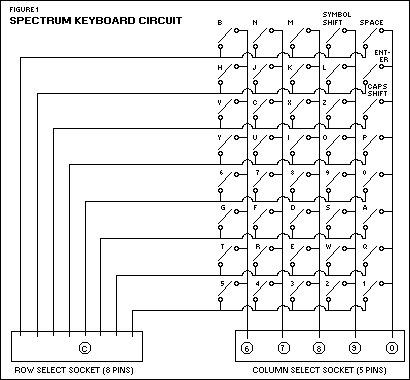 In this first week we experimented with getting it running, making LEDs blink, and, most importantly, getting an initial prototype of the system running. The core concept for our touchpad implementation is the use of rows and columns of conductive fabric to form a button pad. Touch is then used to close circuits which can be detected by the Teensy. Its similar in concept to many button matrix applications, such as the circuit shown at the right.
We implemented a simple version of this with wire hotglued to foam, and the output button displayed on an LED array to ensure that everything'll work right. The full (and working) prototype is pictured below. Ain't it wonderful?
Next week I'll be working on getting Bluetooth to work with an Android App.
18 February 2011
Android Dev Team #3 Week February 16-22
Android Dev Team #3
Week February 16-22Hi, this is our video of the progress for the android development side. The next step would be to get the buttons to be in a toggle state and to create a callback function when pressed. There will need to be some type of gesture list that we hardcode to be compared with new gestures that are inputted.
We used http://code.google.com/p/androidscreencast/ For the Android streaming during the presentation.
Also we need to do the Gantt chart on Sunday I believe.
SVN repsitory for Android Development has been setup as well, you guys are all on windows so google tortouise svn and download that to use the svn. Repository URL is svn://carnagey.com/touchtactics. Your usernames are matt, alex, and michael. The passwords are the same as the username.
06 February 2011
Team #2 Week February 9-15
Team #2
Week February 9-15
Minutes from Initial Meetup on 6.2.11
Kidding, I'm not going to list minutes, that would be silly :)
So we met up for the first time today at Starbucks, the quintessential biz-cazsh (business-casual) conference center. The whole idea was to lay the foundation for the rest of the semester's work: what are some preliminary numbers on our design, what do we need to actually get started, brainstorm and refine and refine again, etc. We executed this venture with exceptional speed and precision: most of our main proposal is complete, we've got some hard numbers to begin designing our first prototype of the armband, and our confidence is sufficiently bolstered.
It's a good thing we have Matt on our team, because without him we'd be left in the dark on the microcontroller and digital circuit design. Miguel is familiar with the Android OS and Android devices, so he'll be one of the main consultants for the application design. Adam is skilled with the Eclipse IDE, which will come in handy with application and especially testing and debugging. I'm eager to start fleshing out and troubleshooting a design for the armband, and I know a pretty good seamstress to help us with this endeavor.
All in all, a great day. The weather was beautiful, and we've all got our work cut out for us now. Tune in for weekly updates on our project, and contact any of us if you're interested in investing.

Cheers,
Michael
Kidding, I'm not going to list minutes, that would be silly :)
So we met up for the first time today at Starbucks, the quintessential biz-cazsh (business-casual) conference center. The whole idea was to lay the foundation for the rest of the semester's work: what are some preliminary numbers on our design, what do we need to actually get started, brainstorm and refine and refine again, etc. We executed this venture with exceptional speed and precision: most of our main proposal is complete, we've got some hard numbers to begin designing our first prototype of the armband, and our confidence is sufficiently bolstered.
It's a good thing we have Matt on our team, because without him we'd be left in the dark on the microcontroller and digital circuit design. Miguel is familiar with the Android OS and Android devices, so he'll be one of the main consultants for the application design. Adam is skilled with the Eclipse IDE, which will come in handy with application and especially testing and debugging. I'm eager to start fleshing out and troubleshooting a design for the armband, and I know a pretty good seamstress to help us with this endeavor.
All in all, a great day. The weather was beautiful, and we've all got our work cut out for us now. Tune in for weekly updates on our project, and contact any of us if you're interested in investing.

Cheers,
Michael
03 February 2011
Team #1 Week February 2-8
Team #1
Week February 2-8
Week 1
Progressive Wearable Computing Solutions
This project group consists of Micheal Atkinson, Miguel Cardenas, Adam Carnagey, and Matthew Moss. Over the coming weeks will be working to design and implement a wearable touch based input mechanism for use by soldiers with android phones.
This blog is part of the requirements for the Texas A&M CSCE 482 "Capstone" course, a final project course that produces caps and stones.
Over this coming week we will work on the design proposal, and getting to know each other.
Progressive Wearable Computing Solutions
This project group consists of Micheal Atkinson, Miguel Cardenas, Adam Carnagey, and Matthew Moss. Over the coming weeks will be working to design and implement a wearable touch based input mechanism for use by soldiers with android phones.
This blog is part of the requirements for the Texas A&M CSCE 482 "Capstone" course, a final project course that produces caps and stones.
Over this coming week we will work on the design proposal, and getting to know each other.
Subscribe to:
Comments (Atom)